
JG iTag Alarm6.9 - Get APK
You'll be able to download in few seconds.
Publisher Description
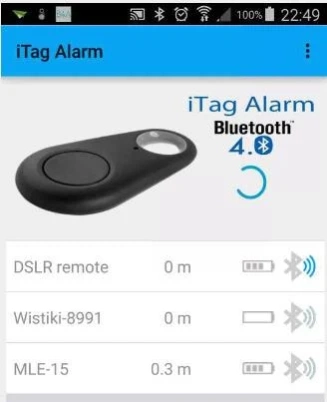
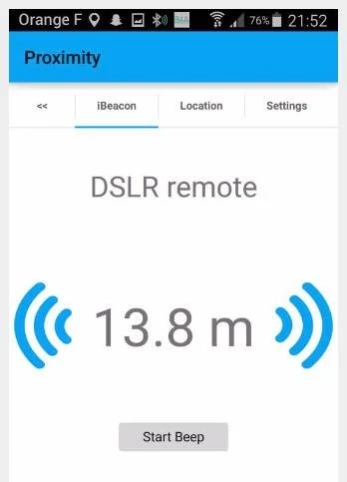
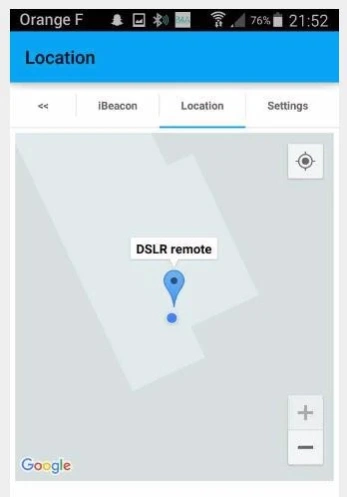
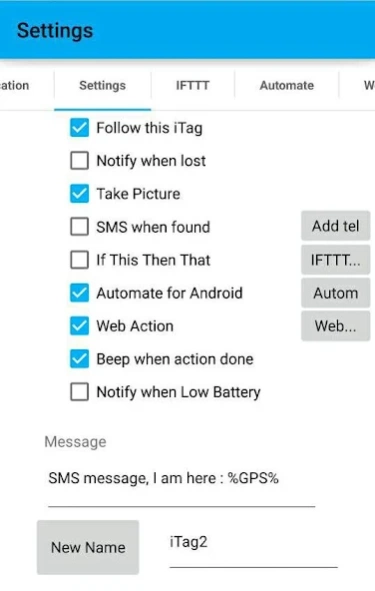
use iTag BLE devices as "magic buttons" to send message, IFTTT action, location
iTags can be found at very cheap prices on internet.
The official App "iTracing" allows to use iTags as "connected ibeacons".
iTag Alarm allows to use your iTag as "magic button" to take pictures or selfies, to send alarms, location to any of your contacts.
iTag Alarm is fully integrated with "If This Then That". With your "magic button" and the "Maker Channel" you can can trigger any "Action Channel" you want
iTag Alarm is fully integrated with "Automate for Android". With your "magic button" launch any flowchart,
iTag Alarm allows you to trigger "web actions" : https links and MQTT integration. Use this for home automation
Use as many iTags everywhere without limitations, each one can trigger its own alarms !
iTag is a Bluetooth Low Energy device. When used with "iTag Alarm" it will draw almost no current, just a little when alarm is activated. So the battery should last very very long...
Pro Version of this App will work totally in the background, with very very low impact on your smartphone precious battery. It will as well remove ads.
Try the App, it's free and could help you to protect your family :
- give an iTag to older people to give them a way to call you in emergency conditions
- give a iTag to your children they can send you alarms with their location with a single click
- put an iTag in the dining room and press it when diner is ready !
- use an iTag to send a "Yo" to your friends
- send your location to friends during your trip or before a meeting
- with IFTTT automate your home and use buttons to make actions such as :
- if iTag On then launch music
- if iTag On then open googleMap and go home (or other address)
- if iTag On then send a mail with choosen content
- if iTag On then switch On cooler, Hue bulb,
- if iTag On then open garage door
- with Automate use buttons to create your automations with flowcharts :
- if iTag On then launch music
- if iTag On then open googleMap and go home (or other address)
- if iTag On then send a mail with choosen content
- if iTag On then switch On cooler, Hue bulb,
- if iTag On then open garage door
- take pictures with your phone as soon as you switch your iTag On, even when the screen is off or when the screen is locked (Pro version)
- and many more that you will invent ...
See here for an examples of "limitless possibilities" :
ITag Alarm + IFTTT + jeedom = home automation : https://www.youtube.com/watch?v=9jqToa4_sEU
iTag Alarm + web Action = Halloween magic Candel : https://www.youtube.com/watch?v=YVPlcz_0l4Q
PLEASE : I have been reported that a very few number of itags do not work with my App (today 0,1%). Before leaving a negative comment, try first your tag with the "iTracing App". If it works then it must work as well with my App. If not it won't work neither ...
Also do NOT pair your iTag with your Phone it is NOT needed.
And don't hesitate to leave 5 stars rating. Thank you
About JG iTag Alarm
The company that develops JG iTag Alarm is JulienGley. The latest version released by its developer is 6.9.
To install JG iTag Alarm on your Android device, just click the green Continue To App button above to start the installation process. The app is listed on our website since 2019-03-02 and was downloaded 0 times. We have already checked if the download link is safe, however for your own protection we recommend that you scan the downloaded app with your antivirus. Your antivirus may detect the JG iTag Alarm as malware as malware if the download link to fr.free.julienGley.iTagAlarm is broken.
How to install JG iTag Alarm on your Android device:
- Click on the Continue To App button on our website. This will redirect you to Google Play.
- Once the JG iTag Alarm is shown in the Google Play listing of your Android device, you can start its download and installation. Tap on the Install button located below the search bar and to the right of the app icon.
- A pop-up window with the permissions required by JG iTag Alarm will be shown. Click on Accept to continue the process.
- JG iTag Alarm will be downloaded onto your device, displaying a progress. Once the download completes, the installation will start and you'll get a notification after the installation is finished.
Program Details
System requirements
Download information
Pricing
Version History
version 6.9
posted on 2019-03-02
v6.9 : SMS sendig no longer allowed by Google. Functionality suppressed now.
v6.4 : Android 8 compatibility, RunTime permissions handling
v5.1 : Added UDP broadcast, https call and MQTT integration
v4.7 : Added "take picture" works when screen locked (Pro version)
v3.4 : major upgrade added "Automate" support : use your iTag to trigger workflows !
v3.2 : major upgrade added "If This Then That" support : use your iTag to trigger everything !
version 6.1
posted on 2017-12-23
v6.1 : Added satellite view on Google Map
v5.9 : Added send large SMS (> 140 chars)
v5.5 : Added notification (allows MacroDroid integration)
v5.1 : Added UDP broadcast, https call and MQTT integration
v4.7 : Added "take picture" works when screen off and when screen locked (Pro version)
v3.4 : major upgrade added "Automate" support : use your iTag to trigger workflows !
v3.2 : major upgrade added "If This Then That" support : use your iTag to trigger everything !
version 5.5
posted on 2017-01-15
v5.5 : Added notification (allows MacroDroid integration),v5.2 : Added German language (Danke Timo),v5.1 : Added UDP broadcast, https call and MQTT integration,v5.0 : Added "take selfie" when you switch On your iTag,v4.7 : Added "take picture" works when screen off and when screen locked (Pro version),v3.4 : major upgrade added "Automate" support : use your iTag to trigger workflows !,v3.2 : major upgrade added "If This Then That" support : use your iTag to trigger everything !
version 5.1
posted on 2016-10-07
v5.1 : Added UDP broadcast, https call and MQTT integration,v5.0 : Added "take selfie" when you switch On your iTag,v4.7 : Added "take picture" works when screen off and when screen locked (Pro version),v4.3 : Added exposure compensation when taking picture,v4.2 : Added "take picture" when you switch On your iTag,v3.4 : major upgrade added "Automate" support : use your iTag to trigger workflows !,v3.2 : major upgrade added "If This Then That" support : use your iTag to trigger everything !
Disclaimer
External Download
We do not host JG iTag Alarm on our servers. We did not scan it for viruses, adware, spyware or other type of malware. This app is hosted by Galad and passed their terms and conditions to be listed there. We recommend caution when installing it.
The APK Download link for JG iTag Alarm is provided to you by apps112.com without any warranties, representations or guarantees of any kind, so access it at your own risk.
If you have questions regarding this particular app contact the publisher directly. For questions about the functionalities of apps112.com contact us.
